Proxmox Port: Proxmox Default Port, Web UI Port, and Common Proxmox Ports
Proxmox Port: Proxmox Default Port, Web UI Port, and Common Proxmox Ports
8006 It’s 8006. Proxmox Default Port is 8006 Its 8006.
If you are trying to connect to a Proxmox server, one of the first things you need to know is the Proxmox port used by the web interface.
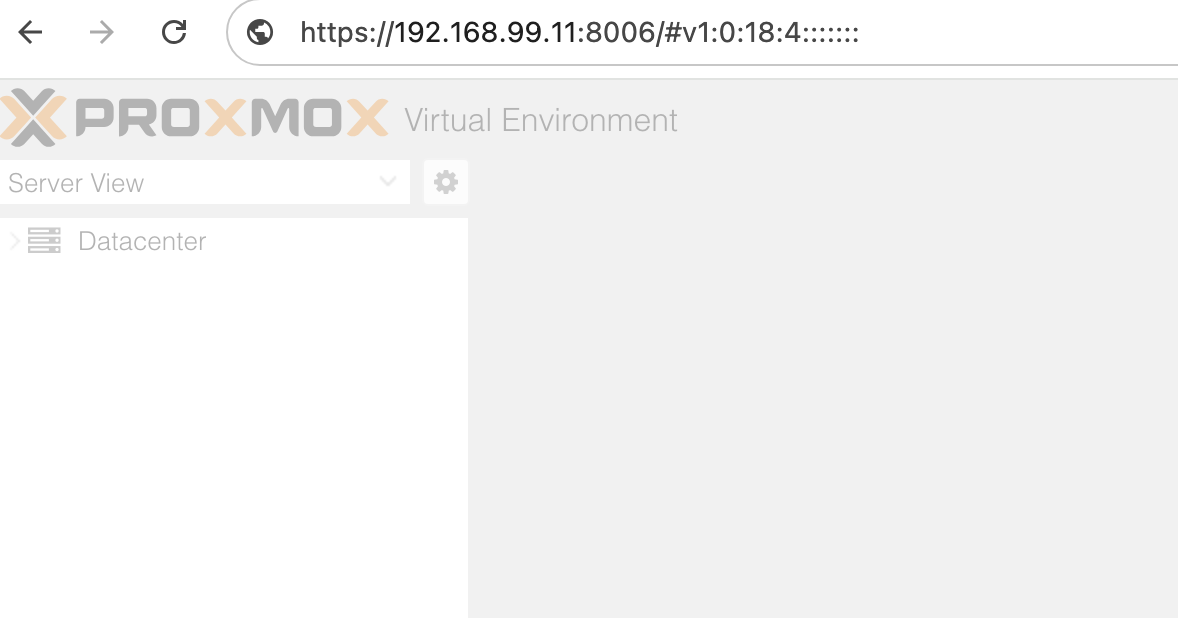
The default Proxmox port is 8006. Proxmox VE uses HTTPS for its web-based management interface, so you normally access a node using:
https://YOUR-PROXMOX-IP:8006For example:
https://192.168.1.100:8006Port 8006 is the default Proxmox web port and Proxmox UI port. The Proxmox VE administration documentation specifies port 8006 for access to the web interface.
What Port Does Proxmox Use?
The default Proxmox port is 8006.
The Proxmox VE web interface is available over HTTPS on TCP port 8006:
| Proxmox service | Default port | Protocol | Purpose |
|---|---|---|---|
| Proxmox Web UI | 8006 | HTTPS/TCP | Web administration interface and API |
| SSH | 22 | TCP | port 22 is used for Command-line administration |
| Proxmox Backup Server | 8007 | HTTPS/TCP | PBS web interface/API |
| Guest/application ports | Varies | TCP/UDP | Services running inside VMs or containers |
The most important number to remember when accessing a new Proxmox VE installation is therefore 8006.
What Is the Proxmox Default Port?
The default Proxmox port is TCP 8006 for the Proxmox VE web interface.
After installing Proxmox VE, open a browser and enter:
https://PROXMOX-IP:8006Replace PROXMOX-IP with the IP address of your Proxmox node.
For example:
https://10.0.0.50:8006You may see a browser certificate warning on a fresh installation because Proxmox initially uses a node-specific certificate that may not be trusted by your browser.
Why Does Proxmox Use Port 8006?
Port 8006 is used by the Proxmox VE web interface and API.
The service responsible for this is called pveproxy. It runs on each Proxmox node and provides the REST API and web GUI.
This means that when you open:
https://192.168.1.100:8006your browser is connecting to the Proxmox node’s pveproxy service.
You can check whether the service is running from the Proxmox shell:
systemctl status pveproxyIf the Proxmox web interface is not loading, checking pveproxy is one useful troubleshooting step.
For more Proxmox service troubleshooting, see our guide on how to properly reload Proxmox services.
Proxmox Web Port vs Proxmox UI Port
You may see several different phrases used to describe port 8006:
- Proxmox port
- Proxmox default port
- Proxmox web port
- Proxmox UI port
- Proxmox VE port
- PVE port
- Proxmox port number
In the context of accessing the Proxmox VE management interface, these terms generally refer to TCP port 8006.
So if someone asks:
What is the Proxmox web port?
The answer is 8006/TCP over HTTPS.
If someone asks:
What port does Proxmox use?
They are usually asking about the Proxmox VE management interface, in which case the answer is again 8006.
How to Access Proxmox on Port 8006
Once Proxmox VE is installed and the node has an IP address, open a web browser on a computer that can reach the Proxmox server.
Enter:
https://IP-ADDRESS:8006For example:
https://192.168.10.20:8006You should then see the Proxmox VE login screen.
Do Not Use HTTP
The normal Proxmox VE management URL is:
https://IP-ADDRESS:8006not:
http://IP-ADDRESS:8006The Proxmox web interface uses HTTPS.
How to Check Whether Proxmox Port 8006 Is Listening
If you cannot access the web interface, check the Proxmox server itself.
One option is:
ss -lntp | grep 8006You can also check the Proxmox proxy service:
systemctl status pveproxyIf pveproxy is running and listening on the expected address and port, the next things to investigate are usually networking, firewall rules, routing, or whether you are connecting to the correct IP address.
You can also check the Proxmox service logs:
journalctl -u pveproxyIf several Proxmox services need to be restarted after a configuration change, see our guide on how to properly reload Proxmox services.
Proxmox Port 8006 Connection Refused
If your browser displays connection refused when you try to access:
https://PROXMOX-IP:8006check the following.
1. Check the Proxmox IP Address
First make sure you are connecting to the correct node:
ip addror:
hostname -IThen try the correct IP address with port 8006.
2. Check pveproxy
Run:
systemctl status pveproxyIf the service is stopped, check its logs before restarting anything:
journalctl -u pveproxy3. Check Whether Port 8006 Is Listening
Run:
ss -lntp | grep 8006A listening socket on port 8006 indicates that something is accepting connections on that port.
4. Check Your Firewall
A firewall between your computer and the Proxmox node can prevent access to TCP port 8006.
Check the Proxmox firewall configuration as well as any firewall on your router, VPS provider, cloud platform, or network.
5. Test Connectivity From Another Machine
From a system that should be able to reach the Proxmox node, you can test the TCP connection:
nc -vz PROXMOX-IP 8006For example:
nc -vz 192.168.1.100 8006If the connection cannot be established, investigate network connectivity and firewall rules.
How to Change the Proxmox Web Port
In most installations, there is no reason to change the default Proxmox web port.
If you have a specific network architecture that requires a different port, make sure you understand how the Proxmox pveproxy service, firewall rules, certificates, reverse proxies, and cluster access are affected before changing the configuration.
For many environments, keeping Proxmox on port 8006 and restricting who can reach that port is simpler than changing the port merely because it is the default.
A better security approach is usually to avoid exposing the Proxmox management interface directly to the public internet.
Use appropriate network segmentation, firewall rules, VPN access, strong authentication, and HTTPS.
Is Proxmox Port 8006 TCP or UDP?
The Proxmox web interface uses TCP port 8006.
The URL is:
https://PROXMOX-IP:8006HTTPS is built on TCP, so a firewall rule allowing access to the Proxmox web interface needs to allow TCP traffic to port 8006.
Do not create a UDP rule for the Proxmox web interface expecting it to provide browser access.
Is Port 8006 the Same as the VM’s Port?
No.
This distinction is important.
Port 8006 belongs to the Proxmox VE host’s management interface.
A VM or LXC container running on Proxmox has its own network stack and can run services on completely different ports.
For example:
Proxmox host
└── 192.168.1.100:8006
And:
VM
└── 192.168.1.110:80
The first port is used to manage Proxmox. The second could be an HTTP server running inside the VM.
Similarly, an application inside a container could use ports such as 8080, 3000, 443, or any other port required by the application.
Proxmox Port vs Application Ports
It is useful to separate Proxmox management ports from ports used by workloads.
Proxmox VE provides the virtualization platform. Your VMs and containers provide the applications.
For example:
Internet / LAN
       |
       v
Proxmox VE
192.168.1.100:8006
       |
       +---- VM 101
       |      192.168.1.101:80
       |
       +---- VM 102
       |      192.168.1.102:443
       |
       +---- LXC 103
              192.168.1.103:8080
In this example, port 8006 is used to administer Proxmox, while ports 80, 443, and 8080 belong to workloads running on the guests.
This is also why opening a port in Proxmox does not automatically make that port available inside every VM or container.
What Is the PVE Port?
PVE stands for Proxmox Virtual Environment.
When someone searches for PVE port, Proxmox VE port, or Proxmox port number, they are often referring to the management interface.
For the default Proxmox VE web interface, that port is:
8006/TCPThe official Proxmox documentation confirms that the web interface is accessed using HTTPS on port 8006.
Proxmox Port 22
Port 22 is normally associated with SSH, not the Proxmox web interface.
If SSH is enabled on the Proxmox node, administrators can use it for command-line access:
ssh root@PROXMOX-IPSSH and the Proxmox web interface are separate services.
So:
TCP 22   = SSH
TCP 8006 = Proxmox web interface/API
Do not confuse the two when configuring a firewall.
Proxmox Port 8007
Port 8007 is commonly associated with Proxmox Backup Server (PBS) rather than the normal Proxmox VE web interface.
That means you should not change a firewall rule for Proxmox VE port 8006 to 8007 simply because both products are part of the Proxmox ecosystem.
For a normal Proxmox VE installation, the management interface remains:
https://PROXMOX-IP:8006Do I Need to Open Port 8006 on My Firewall?
It depends on where you are connecting from.
If your computer and Proxmox server are on the same trusted LAN, you may only need to allow the required internal traffic.
If Proxmox is behind a firewall, router, VPN, or cloud security group, that device may also need to allow TCP 8006.
However, do not automatically expose port 8006 to the entire internet.
The Proxmox web interface is a management interface. Restrict access to trusted networks or a VPN where possible.
A simple approach is:
Internet
   |
   X  TCP 8006 blocked
   |
Firewall
   |
   +---- Trusted LAN/VPN
             |
             +---- Proxmox:8006
This reduces the number of systems that can directly reach the Proxmox management interface.
Proxmox Port Troubleshooting Checklist
If you cannot connect to your Proxmox web interface, work through this checklist:
- Confirm the Proxmox node’s IP address.
- Confirm that you are using
https://, nothttp://. - Confirm that you are using port 8006.
- Check that
pveproxyis running. - Check whether TCP 8006 is listening.
- Check the Proxmox firewall.
- Check any router, VPS, cloud, or network firewall between you and the node.
- Test TCP connectivity from the client.
- Check
pveproxylogs for errors. - If services appear stuck, restart them carefully rather than immediately rebooting the entire server.
For the last step, our guide on reloading Proxmox services covers useful commands and service troubleshooting.
Frequently Asked Questions
What Is the Default Proxmox Port?
The default Proxmox VE web interface port is 8006/TCP.
What Port Does Proxmox Use?
Proxmox VE uses TCP port 8006 for its HTTPS web interface and API by default.
What Is the Proxmox Web Port?
The Proxmox web port is 8006.
Access it using:
https://YOUR-PROXMOX-IP:8006What Is the Proxmox UI Port?
The default Proxmox UI port is 8006/TCP.
What Is the Proxmox VE Port?
For the Proxmox VE web interface, the default port is 8006.
Is Proxmox Port 8006 TCP or UDP?
Port 8006 is TCP for the Proxmox web interface.
Can I Change the Proxmox Port?
It is possible to customize network configuration, but changing the management port is not normally necessary. If you do change it, make sure your firewall and any reverse-proxy or networking configuration are updated accordingly.
Why Can’t I Access Proxmox on Port 8006?
Common causes include an incorrect IP address, pveproxy not running, a firewall blocking TCP 8006, routing problems, or connecting from a network that cannot reach the Proxmox node.
Does Every Proxmox VM Use Port 8006?
No. Port 8006 is the Proxmox VE host’s management interface. VMs and containers can use their own network ports.
Final Answer: What Is the Proxmox Port?
If you only need the short answer:
The default Proxmox port is 8006/TCP.
The normal Proxmox VE web interface is:
https://YOUR-PROXMOX-IP:8006Port 8006 is used by the Proxmox web interface and API through the pveproxy service.
If port 8006 is not working, check the Proxmox IP address, pveproxy, listening sockets, and firewall rules before changing the port itself.
For more Proxmox administration guides, visit the Proxmox section on Rubi.me.
Do you know whats the whats Nginx Default Port is ?