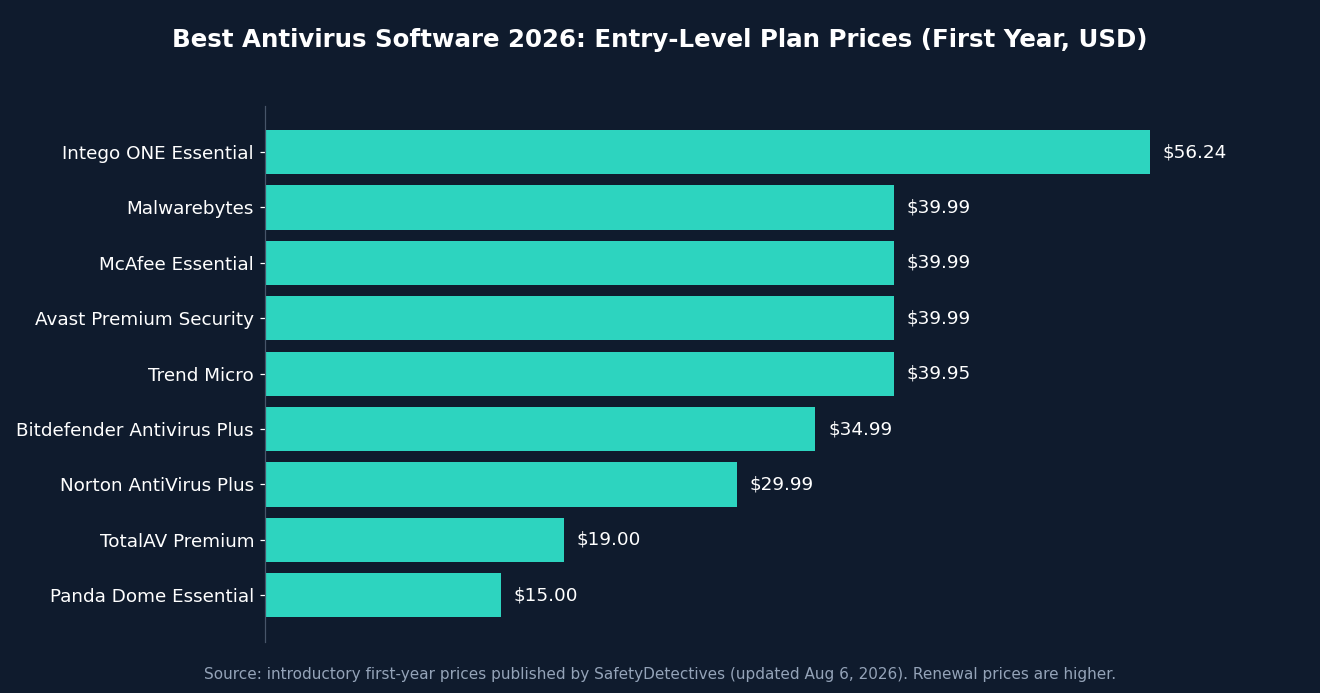
Last updated: October 2026. Prices and promotions change often, so check each vendor’s page before you buy.
Choosing the best antivirus software for 2026 is harder than it used to be. Windows Defender is better than it once was, Macs and phones face real threats now, and every brand bundles a VPN, password manager and “dark web monitoring” into a different tier. Meanwhile, ransomware, phishing and scam-as-a-service kits keep getting more convincing.
This guide cuts through the noise. We compared the leading security suites using independent lab data from AV-TEST and AV-Comparatives, plus the published hands-on reviews from PCMag and SafetyDetectives. Then we weighed what matters to everyday buyers: protection, performance impact, features, device coverage and price.
Quick answer: the best antivirus for 2026
- Best overall: Norton 360 (strong protection plus the broadest bundle of extras)
- Best for protection with low system impact: Bitdefender
- Best for beginners: TotalAV
- Best for families and unlimited devices: McAfee
- Best free option: Avast One Basic (or Bitdefender Free / Avira Free)
- Best for Mac: Intego ONE
- Best on a budget: Panda Dome

Table of Contents
- Antivirus comparison table
- The 10 best antivirus programs reviewed
- How we evaluate antivirus software
- How to choose the right antivirus
- Frequently asked questions (14 answered)
Best Antivirus Software 2026: Side-by-Side Comparison
| Antivirus | Best for | Entry price (1st year) | Platforms | Free plan | Money-back |
|---|---|---|---|---|---|
| Norton 360 | Best overall | $29.99 (AntiVirus Plus); $49.99 (360 Deluxe) | Windows, Mac, Android, iOS | No | 60 days |
| Bitdefender | Protection, light on system | $34.99 (Antivirus Plus); $54.99 (Total Security) | Windows, Mac, Android, iOS, ChromeOS | Yes (limited) | 30 days |
| TotalAV | Beginners | $19.00 (Premium); $49.00 (Total Security) | Windows, Mac, Android, iOS, ChromeOS | Select countries | 30 days |
| McAfee | Families, many devices | $39.99 (Essential); $69.99 (Premium) | Windows, Mac, Android, iOS, ChromeOS | No | 30 days |
| Panda Dome | Flexible pricing | $15.00 (Essential) | Windows, Mac, Android, iOS | Yes | 30 days |
| Intego ONE | Mac | $56.24 | Mac, Windows | No | 30 days |
| Avast | Free plan, beginners | Free; $39.99 (Premium Security) | Windows, Mac, Android, iOS | Yes | 30 days |
| Avira Prime | PC tune-up tools | From about $26.99; $59.99 (Prime) | Windows, Mac, Android, iOS, ChromeOS | Yes | 60 days |
| Malwarebytes | Simple second layer | $39.99 | Windows, Mac, Android, iOS, ChromeOS | Yes | 60 days |
| Trend Micro | Safe web browsing | $39.95 | Windows, Mac, Android, iOS, ChromeOS | No | 30 days |
Pricing and plan details are drawn from the SafetyDetectives antivirus rankings (updated August 6, 2026). Intro offers typically apply to the first year only.
The 10 Best Antivirus Programs for 2026, Reviewed
#1 Best overall
1. Norton 360: Best All-Round Antivirus
Norton remains the most complete consumer security package on the market. SafetyDetectives rated it first in its 2026 roundup and reported a 100% detection rate in its malware tests. Its engine combines heuristics and machine learning, and the suite covers a lot of ground: a customizable firewall, a password manager, anti-phishing, ransomware protection, dark web monitoring, parental controls and up to 500 GB of cloud backup on higher tiers.
- Top-tier malware protection
- VPN with no data cap
- Excellent extras, including cloud backup
- 60-day money-back guarantee
- No free plan
- Some Mac features are limited by Apple’s restrictions
- Renewal prices rise after year one
Who it’s for: households that want one subscription to cover antivirus, VPN, backup and identity protection. The 360 Deluxe plan is the best-value tier for most people. In the US, the LifeLock plans add identity-theft restoration and reimbursement.
#2 Best protection, lightest footprint
2. Bitdefender: Best for Lab-Tested Protection
Bitdefender is the name security testers keep coming back to. Its scanning runs in the cloud, so full scans barely slow a modern PC, and false positives are low. Notable features include Safepay (a hardened browser window for banking), multi-layer ransomware protection, a vulnerability scanner, webcam and microphone protection, and on top tiers, Scam Copilot for spotting scams. PCMag has awarded Bitdefender its Editors’ Choice badge in antivirus categories, and the product consistently lands in the top bracket of AV-Comparatives and AV-TEST results.
- Excellent detection with minimal slowdown
- Strong anti-phishing and ransomware layers
- Competitively priced multi-device plans
- Bundled VPN is capped at 200 MB/day on most plans
- Mac and iOS apps are leaner than the Windows version
Who it’s for: anyone who wants maximum protection without feeling it on an older or mid-range laptop. Total Security ($54.99 first year) is the sweet spot; you only need Premium Security ($64.99) for the unlimited VPN.
#3 Best for beginners
3. TotalAV: Easiest Antivirus to Use
TotalAV wraps a reliable scanner in the friendliest dashboard in the category. One “smart scan” combines a virus check, a tracking-cookie sweep and a junk-file cleanup. Extras include a browser extension (WebShield), a password manager, an ad blocker and a VPN. It also works on Chromebooks and even Kindle Fire tablets.
- Very easy to set up and use
- Strong real-time protection
- Good system cleanup tools
- Low entry price
- No built-in firewall
- More false positives than Norton or Bitdefender in SafetyDetectives’ tests
- Frequent upgrade prompts
Who it’s for: first-time buyers and anyone who wants “install it and forget it.” Cheapest paid tier starts at $19/year; Total Security ($49/year) covers up to 8 devices.
#4 Best for families
4. McAfee: Best for Unlimited Devices and Parental Controls
McAfee’s higher tiers cover an unlimited number of devices, which makes it hard to beat for big households. Its web protection is strong, its scam-link warnings extend to texts and social media, and its parental controls include accurate location tracking. Premium plans add personal-data cleanup (removing your details from data-broker sites). Reviewers do report noticeable slowdown during full scans.
Who it’s for: families with lots of phones, tablets and PCs. Plans start at $39.99 for 5 devices; Premium at $69.99 covers unlimited devices.
#5 Best budget
5. Panda Dome: Most Flexible Pricing
Panda lets you choose a plan by feature and device count, with a free tier and paid options starting around $15/year. Real-time protection performed well in SafetyDetectives’ tests, and the Rescue Kit (a free bootable antivirus) is handy for badly infected PCs. The trade-offs: full scans can be slow, false positives are higher than the top two, and the VPN is limited on lower plans.
Who it’s for: budget buyers who want to pay only for what they need.
#6 Best for Mac
6. Intego ONE: Best Mac-Focused Antivirus
Intego builds specifically for macOS. It adds a two-way firewall, real-time protection and Mac cleanup tools on top of Apple’s built-in defenses, and it can scan external drives and connected iPhones. The price is higher than rivals, and it lacks parental controls. Disclosure: SafetyDetectives, which we cite throughout this article, says Intego ONE shares an ownership group with its site, so weigh that review accordingly. If you’d rather stay with a cross-platform suite on Mac, Norton and Bitdefender are solid alternatives.
See our section on whether Macs need antivirus below.
#7 Best free plan
7. Avast: Best for Beginners Who Want a Free Option
Avast One Basic gives you core scanning, web protection and a limited VPN at no cost, and paid tiers scale up to identity-theft insurance in the US. Avast scored a perfect detection rate in SafetyDetectives’ tests, though full scans took about an hour and parental controls are a separate product.
#8 Best PC tune-up
8. Avira Prime: Best for Speeding Up an Older PC
Avira’s cloud-based engine is light on resources, and Prime bundles a startup optimizer, game booster, junk cleaner, VPN and password manager. Its free version is one of the better free options. It does not include parental controls.
#9 Best simple add-on
9. Malwarebytes: Best for Basic Protection
Malwarebytes is a minimalist, easy-to-use scanner with strong web filtering and exploit protection. SafetyDetectives measured a lower detection rate than the leaders and noted there is no standalone firewall, but it pairs well with Microsoft Defender as an extra layer. A 60-day guarantee backs paid plans.
#10 Best web protection
10. Trend Micro: Best for Safe Browsing
Trend Micro’s browser extension caught more phishing pages than Chrome, Firefox or Safari in SafetyDetectives’ comparison, and it adds social-media privacy checks and online-banking protection. Core malware detection trailed the top tier, and there’s no standalone firewall.
Honorable mentions: SafetyDetectives also reviewed ESET, Webroot, Sophos and AVG but left them off its top list for usability, bundling or value reasons. MacKeeper is a Mac-only option with good cleanup tools but no firewall or anti-phishing.
How We Evaluate Antivirus Software
A great antivirus does five things well. We weighted them like this:
- Protection. We lean heavily on independent labs. AV-TEST scores products out of 18 points across protection, performance and usability; 17.5 or more earns a “Top Product” badge. AV-Comparatives ran its Real-World Protection Test on 20 home-user products from February to May 2026, using live malicious URLs.
- Performance impact. Does it slow downloads, app launches or gaming? Cloud-based scanners like Bitdefender’s tend to win here.
- Features that actually work. A firewall, anti-phishing, ransomware rollback and a decent password manager are valuable. A VPN capped at 200 MB a day is not.
- Platform support. Windows, macOS, Android, iOS and ChromeOS all need different protections.
- Price and transparency. We compare first-year and renewal prices, device limits and refund policies.
How to Choose the Best Antivirus for Your Needs
Start with your devices
Count every phone, tablet and computer in the household and note the operating systems. Single-device buyers can go cheap; families should look at unlimited-device plans from McAfee or multi-device bundles from Norton and Bitdefender.
Decide which extras you actually want
A bundled password manager and VPN can replace separate subscriptions, but dedicated products are often stronger. If you only want malware protection, don’t pay for a bundle you won’t use.
Check the renewal price
Most vendors discount the first year heavily and raise the price at renewal. Set a calendar reminder before renewal day, or compare prices again then.
Use the money-back guarantee
Every paid product here has a 30- or 60-day refund window. Install it, run a full scan, check performance on your actual machine, and refund it if it doesn’t suit you.
Frequently Asked Questions About the Best Antivirus Software
These are the questions shoppers ask most often, answered in plain language.
What is the best antivirus software in 2026?
For most people, Norton 360 and Bitdefender are the strongest all-round choices. Norton offers the biggest bundle of extras (firewall, VPN, password manager, cloud backup), while Bitdefender is renowned for protection with minimal slowdown. SafetyDetectives ranks Norton first in its 2026 roundup, and both brands consistently land near the top of independent lab tests. Your best pick depends on your devices, budget and which extras you value.
Do I still need antivirus software in 2026?
Yes, in most cases. Operating-system protection has improved, but attackers now use phishing, fake browser extensions, malicious ads and scam texts that bypass basic defenses. A good security suite adds layers like web filtering, ransomware protection and scam alerts. If you’re careful and keep everything updated, Microsoft Defender may be enough on a single Windows PC, but a paid suite gives you stronger web protection and covers phones and tablets too.
Is Windows Defender good enough in 2026?
Microsoft Defender is a decent free baseline and has improved over the years. SafetyDetectives notes, however, that it still scores lower on malware detection than top paid options and lacks extras like a password manager, performance tools and dark web monitoring. Read their detailed breakdown: Is Windows Defender good enough? Defender usually turns itself off automatically when you install another antivirus.
Is free antivirus good enough?
Free antivirus is a solid starting point, especially from Avast, Avira, Bitdefender and Panda. The limits: free versions often skip ransomware protection, advanced web filtering, a full-featured VPN, and customer support, and they nag you to upgrade. If you handle online banking, remote work or family devices, paid protection is worth the modest cost. Android users can also check this list of free Android antivirus apps.
How much does antivirus software cost?
Expect to pay roughly $15 to $60 for the first year on an entry-level plan. Norton starts around $29.99, Bitdefender $34.99 and TotalAV $19 in introductory pricing, according to SafetyDetectives. Bundles with VPN, identity protection and cloud backup cost more. Renewal prices are typically higher than the first-year price, so check the fine print.
Which antivirus has the best malware detection?
Several vendors, including Bitdefender, Norton, Avast and McAfee, regularly score at or near the maximum in independent tests. For the most current numbers, check the live results from AV-TEST and the AV-Comparatives Real-World Protection Test, since scores move month to month.
Will antivirus software slow down my computer?
It can, mostly during a full scan. The best modern suites are designed to stay out of the way: Bitdefender’s cloud scanning keeps its footprint small, and Norton and TotalAV also handle scans efficiently. McAfee and Panda drew complaints about slower full scans in SafetyDetectives’ tests. Schedule scans for when you’re away from the PC to avoid noticing any slowdown.
What is the best antivirus for Windows 11?
Norton 360 and Bitdefender are the top choices for Windows 11 in most reviews, with strong protection, firewalls and low system impact. TotalAV is a great beginner option and Avast is a good free alternative. Each of these runs natively on Windows 11, and the AV-TEST Windows tests are run on current Windows versions.
Does a Mac need antivirus software?
Macs are safer by design, but they are not immune. Adware, spyware, phishing, infostealers and trojans do target macOS. Apple’s built-in tools (Gatekeeper, XProtect) help, but a dedicated Mac antivirus adds real-time scanning, web filtering and a firewall. See SafetyDetectives’ guide: Does a Mac need antivirus? Intego ONE, Bitdefender and Norton are the leading Mac options.
Do iPhones and Android phones need antivirus?
Android benefits from antivirus because you can sideload apps and malicious apps do slip through, so a trusted app that scans apps and blocks scam links is worthwhile. iPhones cannot get traditional viruses, but they’re still exposed to phishing, scam texts, risky Wi-Fi and identity theft, so a security app’s web protection and breach alerts can help.
Do Chromebooks need antivirus?
Chromebooks have strong built-in security, but they’re still exposed to phishing, malicious extensions and risky Android apps. Not every antivirus works well on ChromeOS, so pick one with a dedicated Chromebook app. TotalAV, Bitdefender, McAfee, Avira and Malwarebytes all list ChromeOS support. More detail: Does a Chromebook need antivirus?
Can I run two antivirus programs at once?
Generally no. Two real-time scanners can conflict, slow your system and cause crashes or missed threats. The exception: an on-demand scanner like Malwarebytes is designed to run alongside Microsoft Defender as a second opinion. Pick one primary suite and keep it updated.
What is the difference between antivirus and internet security?
Antivirus focuses on detecting and removing malware. “Internet security” or “total security” suites add a firewall, anti-phishing, parental controls, a password manager, a VPN, system optimization and sometimes identity monitoring. If you only need malware protection, choose the entry plan; if you want everything under one subscription, choose the mid-tier plan.
How can I tell if my computer has a virus?
Common warning signs include unexpected pop-ups, a browser homepage you didn’t set, sudden slowness, programs you didn’t install, fans running at full speed with nothing open, and files that are renamed or locked. If you suspect an infection, disconnect from the internet, run a full scan with your antivirus, and change important passwords from a clean device afterward.
Is antivirus enough to protect me online?
Antivirus is a key layer but not the whole answer. Pair it with these habits: install system and app updates promptly, use a password manager and unique passwords, turn on two-factor authentication, back up important files, and be skeptical of unexpected links or attachments. The best antivirus catches what you miss, but your habits stop most attacks before they start.
Final Verdict: Which Antivirus Should You Buy?
If you want one recommendation, Norton 360 Deluxe offers the best mix of protection and extras for most households. If you value the lightest footprint and top lab scores, choose Bitdefender Total Security. Beginners should look at TotalAV, large families at McAfee, Mac owners at Intego ONE, and anyone on a tight budget at Panda Dome or a reputable free plan. Whichever you choose, use the money-back guarantee to test it on your own devices.
Sources and Further Reading
- SafetyDetectives: 10 Best Antivirus Software in 2026
- PCMag: The Best Antivirus Protection
- AV-TEST: Best Windows Antivirus for Home Users
- AV-Comparatives: Real-World Protection Test, February to May 2026
- SafetyDetectives: Best Antivirus for Windows
- SafetyDetectives: Best Antivirus for Mac
Disclosure: some links are affiliate links. Product details and prices were compiled from the sources above in October 2026 and may change.